
Getting the App
We run a licensed mobile casino for players in Ontario who prefer to keep everything on their phone rather than on desktop. The Caesars Palace Online Casino app includes slots, blackjack, roulette, live dealer tables, and video poker. You can install it through the App Store or Google Play, or just stay in your browser if you do not want anything extra on your device.
Our Ontario platform went live in April 2022 under Caesars Entertainment, Inc. The same account works on both iOS and Android. The interface is built for touchscreens, but the game lineup and core features stay in sync with the desktop site.
iOS Setup
On iPhone and iPad you install the app directly from the App Store. Search for Caesars Palace Online Casino and check that the publisher is listed as Caesars Palace Online Casino. The app is rated 19+ for all users in Ontario. After that, tap to download. When you open it the first time, allow location services - this lets us confirm you are physically in Ontario when you play.
We recommend keeping your device on a newer iOS version so games load quickly and live dealer streams stay smooth. Very old models can run, but some tables might lag or drop quality.
Android Installation
On Android the process runs through Google Play. Search for Caesars Palace Online Casino and confirm the package ID reads com.caesarsdigital.igaming.caesarspalaceonline so you know you are installing the correct app. Then install, accept the requested permissions, and turn on location access. The app has received over 100,000 downloads with a 4.0 star rating from more than 3,300 reviews.
Check storage space before you hit download, especially on devices that are almost full. The app itself is not huge, but updates and cached game files need some room to breathe.
Browser Option
If you prefer not to install anything, you can still play through the mobile site. The HTML5 version opens in any current browser and mirrors the same games and main functions. No updates, no download, just a stable connection and you are good.
Creating Your Account
You create your casino account straight inside the Caesars Palace Online Casino app. We are required to verify that you are at least 19 and actually located in Ontario. The online casino is available only in Michigan, New Jersey, Ontario, Pennsylvania, and West Virginia. Tap sign up, then enter your full name, date of birth, and Ontario address. Choose a strong password with a mix of letters, numbers, and symbols.
Read through the terms and the responsible gaming details, then tick to accept. After submitting the form, look for a verification message in your email and follow the link there. Identity checks continue in the app - you upload photos of your ID, and our systems process them. Clear images usually move through the queue quicker.
Sometimes verification sits a little longer during busy hours, but we update your account status and send you a note as soon as everything is confirmed.
What You Can Play
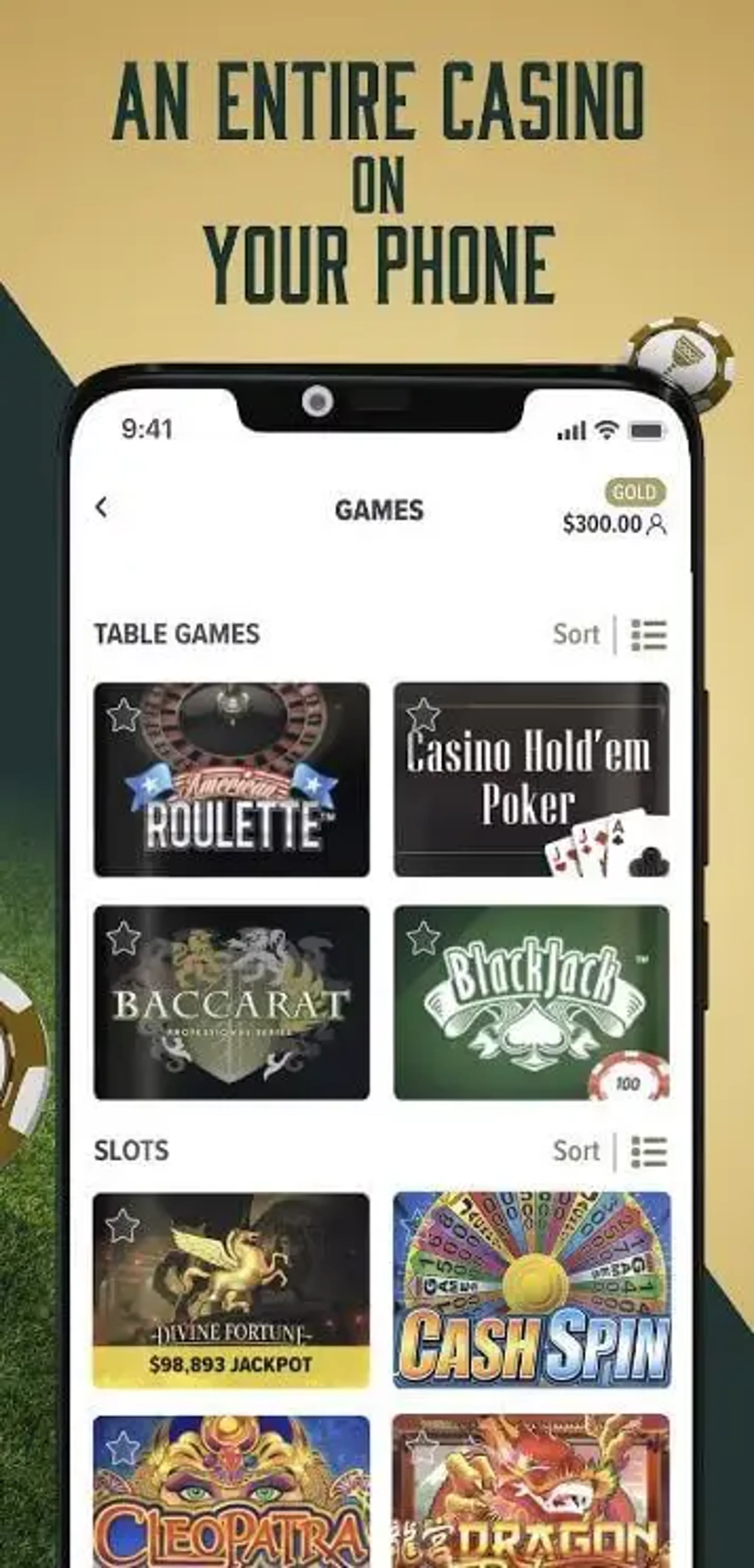
Our games come from providers like NetEnt, Playtech, IGT, WMS, and Konami Gaming. The lobby is broken into simple categories so it is easier to find what you want on a smaller screen.
| Game Type | Number of Titles | Mobile Features |
|---|---|---|
| Slots | 700+ | Touch controls, portrait |
| Blackjack | Multiple variants | Simplified betting layout |
| Roulette | European, American | Zoom controls |
| Live Dealer | Real-time tables | Video streaming |
| Video Poker | Classic versions | Landscape orientation |
| Baccarat | Standard, speed | One-tap bets |
The live dealer section features 39 tables and show programs from Evolution Gaming, giving you real-time play with professional dealers. You can filter by studio, scroll by category, or type in a game name if you know it. Favorite tags let you pin regular picks so they show up first when you come back.
Moving Around the App
Navigation runs through a fixed bar at the bottom of the screen. From there you move between the main game lobby, featured picks, and your account. The dashboard shows your current balance, recent games, and active offers. In the profile area, you handle deposits, withdrawals, full transaction history, and your Caesars Rewards Credits.
Game sessions auto-save on our side. You can close a slot or lose connection, then reopen later and continue from the same point where that title supports it. Push notifications stay optional - you can flip them on for promo alerts or important account messages, or keep them off if you prefer less noise.